A shared inbox often becomes an unofficial operations system.
For many teams, important work starts with an email.
It might be:
- A customer request
- A maintenance issue
- A service enquiry
- A supplier question
- An onboarding request
- A compliance document
- An internal support request
- A request that needs somebody’s approval
The email itself is not usually the problem.
The work starts after it arrives.
Someone has to read it, work out what it is about, decide whether it is urgent, find the relevant customer, job or account, understand what has already happened, decide who should handle it, work out whether approval is required, prepare a response and make sure the request does not disappear.
When that happens dozens or hundreds of times, the shared inbox becomes a coordination system held together by people.
A Shared Inbox Routing & Approval workflow is designed to take that repetitive coordination work out of the inbox.
How the system works
The basic pattern is:
Email arrives → understand the request → retrieve context → apply rules → route the work → prepare next action → approval where required
The aim is not to replace email.
It is to turn email into a more dependable starting point for the work that happens afterwards.
1. Pick up requests where they already arrive
The system can begin with the shared mailbox the team already uses.
That might be:
- Microsoft 365 / Outlook
- Gmail
- A departmental mailbox
- A customer-service inbox
- Another email or ticketing platform
There is no requirement for the business to move everything into a new application simply to automate the workflow.
A new request arrives through the normal channel and the system begins processing it in the background.
2. Work out what the request actually needs
Not every email should be treated the same way.
The system can identify useful information such as:
- Who sent it
- Which customer or account it relates to
- The type of request
- The service, job or location involved
- Urgency
- Relevant dates
- Whether something is missing
- Whether the request appears routine or exceptional
For example, “Can you send me another copy of last month’s report?” and “There is water leaking beside an electrical cabinet” might arrive in exactly the same inbox.
They should not follow the same path.
The system can help distinguish between them before somebody manually sorts the queue.
3. Bring in the context your team would normally have to find
Understanding the email is only part of the job.
The person handling it may also need information from elsewhere.
That could include:
- The CRM
- Customer records
- Property or asset information
- Previous requests
- Service history
- Project-management software
- Policies
- Contracts
- Approval limits
- Internal knowledge
- Another operational database
Instead of somebody opening several systems to reconstruct the situation, the relevant context can be brought into the workflow automatically.
For example:
- Customer: existing account
- Job: open service request
- Previous contact: engineer attended yesterday
- Contract: emergency call-out covered
- Current status: awaiting replacement part
Now the person reviewing the request starts with the situation already assembled.
4. Route different requests down different paths
Once the request and context are understood, the system can apply the organisation’s rules.
Routine request. A straightforward request can be classified, assigned to the appropriate team and given a prepared response.
Urgent request. An issue matching agreed urgency or safety criteria can be surfaced immediately to the appropriate person rather than waiting in the normal inbox queue.
Missing information. The request can be held and a draft prepared asking for whatever is needed before the work continues.
Specialist request. A technical, finance or compliance-related issue can be routed directly to the team responsible for it.
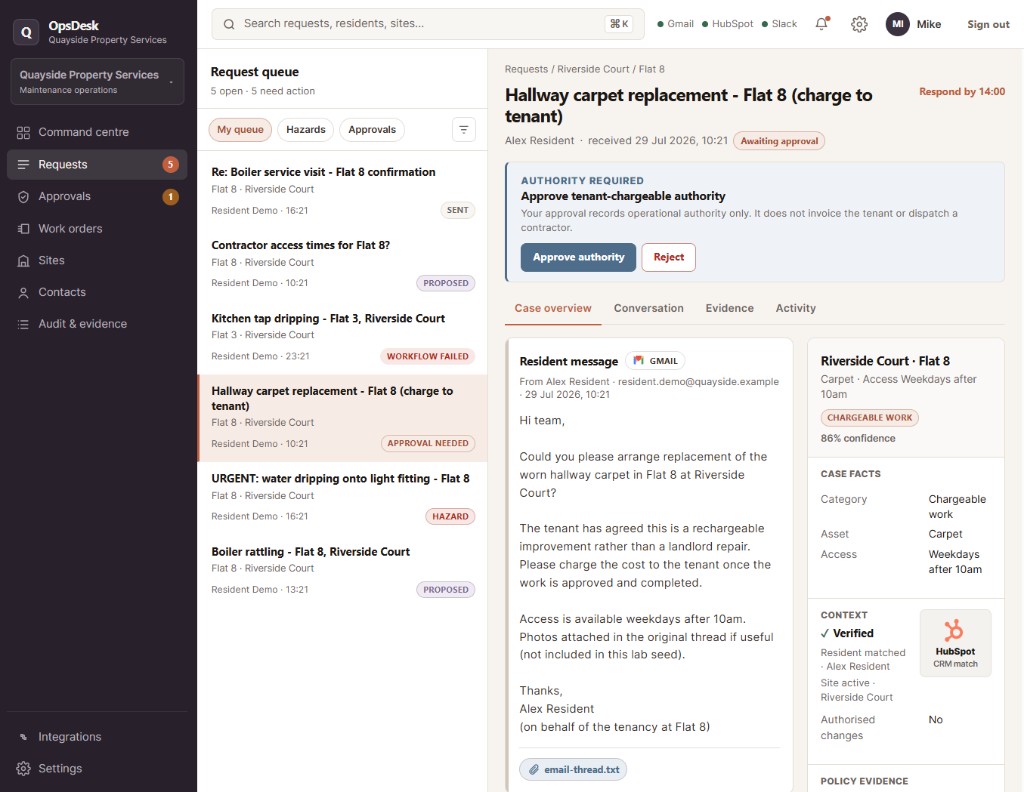
Sensitive or chargeable action. If progressing the request would create cost, make an external commitment or cross another agreed boundary, the workflow can stop and ask the authorised person to approve what happens next.
The inbox remains the starting point.
The system determines the right operating path after that.
Routine work can keep moving
Not every email needs somebody to manually decide every step.
Where the rules are clear, the workflow can handle the repetitive preparation.
That could mean:
- Creating or updating the relevant record
- Assigning the request
- Adding the correct category
- Gathering supporting information
- Preparing a reply
- Creating an internal task
- Alerting the right team
- Setting a follow-up
- Moving the request to its next stage
The person handling the work sees something that is already prepared instead of starting again from the raw email.
Exceptions get more attention, not less
The purpose is not to make every request disappear into automation.
A well-designed system should make the unusual cases more visible.
Urgent issue. Requires immediate escalation.
Unable to identify customer. The request cannot be safely matched to an existing record.
Conflicting information. The email and business system disagree.
Approval required. The proposed next action exceeds an agreed authority level.
Uncertain classification. The system is not confident enough to route the request automatically.
Integration failure. A connected business system did not respond correctly.
Instead of hiding those situations, the workflow can deliberately stop and surface them for somebody to resolve.
Important decisions stay with the right people
The system can do a large amount of preparation without being allowed to make every decision.
It might classify the request, retrieve context, apply routine rules, recommend the next action, prepare a response, route the work and create internal records.
But agreed boundaries can remain behind human approval.
For example:
- Approve additional spend
- Authorise a customer commitment
- Approve an exception
- Review an uncertain case
- Approve a sensitive external response
That gives the organisation automation where the process is predictable without handing control of consequential decisions to the automation itself.
The response can be prepared before anyone writes it
Many shared-inbox requests require similar responses.
Once the request and relevant context are available, the system can prepare a draft using the information already gathered.
We’ve matched your request to job 1842. The replacement part is currently due tomorrow and the engineer is scheduled to return once it arrives.
The operator can see the original email, the relevant context, what the system identified, the proposed next action and the prepared response.
They review it, make any changes required and approve the response according to the organisation’s rules.
The repetitive drafting work is reduced, while the person remains responsible where judgement matters.
A clearer record of what happened
One problem with inbox-led processes is that the history of a request can end up spread across email, CRM, internal chat, somebody’s memory and another email.
A connected workflow can keep a structured record of the important steps.
For example:
- What request arrived
- What information was identified
- Which customer or job it was matched to
- Which rules were applied
- What context was retrieved
- Where it was routed
- What response was prepared
- Whether approval was required
- Who made the decision
- What happened next
That makes the process easier to follow when somebody needs to pick up the work later.
It also makes it much easier to understand why something was escalated, delayed or approved.
It does not have to be Gmail, HubSpot or Slack
The important part is the workflow, not a specific software stack.
A real implementation might connect:
Email. Microsoft 365, Outlook, Gmail or the organisation’s existing shared-mailbox platform.
Customer or operational context. HubSpot, Salesforce, another CRM, an industry-specific system, a database or existing internal software.
Internal work. A task-management platform, service system, helpdesk or another operational tool.
Alerts. Teams, Slack, email or whatever communication channel the organisation already uses.
Knowledge. Approved policies, procedures, customer information or internal documentation.
Layer would first understand where the information already lives and then design the workflow around those systems.
The aim is to connect the tools the business already depends on rather than introduce another platform without a reason.
What this could look like in practice
Imagine a service team receives 120 requests through a shared inbox during the week.
Instead of somebody manually sorting all 120 from the beginning:
- 72 routine requests are recognised, matched to the right context and prepared for the normal route.
- 18 are urgent and are surfaced immediately to the appropriate team.
- 14 need additional information and have the appropriate follow-up prepared.
- 9 require another department and are routed with the relevant context already attached.
- 5 require approval and stop at the correct decision-maker.
- 2 cannot be handled confidently and are placed in an exception queue for somebody to review.
The exact numbers will vary by business.
The point is that the team no longer has to treat every email as a brand-new coordination problem.
Routine requests keep moving. Important exceptions become easier to see.
What Layer would actually build
This is not a packaged shared-inbox product that gets installed identically for every business.
The example represents a workflow pattern.
A real implementation would begin by understanding:
- Which inboxes important work arrives through
- What types of requests appear
- How the team currently prioritises them
- Which business systems contain the supporting context
- What can safely be routed automatically
- Which situations need escalation
- Who has authority to approve different actions
- What responses can be prepared
- What records need to be updated
- What should happen when the system is uncertain or something fails
Layer would then design the simplest controlled workflow around those requirements.
Some steps may be straightforward automation.
AI may be useful where the system needs to understand unstructured language or prepare a contextual draft.
Critical routing, safety, authority and approval rules can remain explicitly controlled.
The practical outcome
A useful Shared Inbox Routing & Approval system should mean:
- Less time manually sorting email
- Requests reaching the right person faster
- Urgent work becoming harder to miss
- Relevant customer or job context available earlier
- Less repetitive copying between systems
- Responses prepared rather than written from scratch
- Exceptions and approval requests clearly surfaced
- A better record of what happened to each request
And most importantly: your inbox stops being the place where your team has to manually coordinate the entire process.
Example shown as an illustrative system using synthetic data. A real implementation would be designed around the organisation's existing email platform, business systems, routing rules and approval process.