Most prospecting starts with too much manual research.
Finding a company is usually the easy part.
The work starts afterwards.
Someone still needs to understand:
- What the company does
- Whether it resembles a good customer
- How large it is
- Whether there are signs of growth
- What tools it uses
- Who might own the relevant problem
- Whether there is any reason to contact them now
- What the outreach should actually say
That often means jumping between websites, LinkedIn, search results, job listings, CRM records and spreadsheets.
And after all of that research, the prospect might still be a poor fit.
A Sales Opportunity Intelligence system is designed to move that research and qualification work forward before a salesperson needs to spend time on it.
How the system works
The basic pattern is:
Target companies → research → enrich → assess fit → identify opportunity → prepare outreach → human review
Instead of treating every prospect equally, the system helps surface the companies where there is the strongest evidence of a worthwhile sales opportunity.
1. Continuously research target companies
The system can work from an approved target list or defined market.
For example: UK service businesses with 10–75 employees. Or facilities-management companies using several disconnected operational systems.
For each target company, the system can gather appropriate public and approved information such as:
- Company size
- Sector
- Location
- Services
- Technology signals
- Hiring activity
- Expansion
- Operational roles
- Recent company changes
- Relevant website information
- Existing CRM history
The aim is not to collect everything available.
It is to gather the information that helps answer: is this company worth somebody’s time?
2. Enrich the prospect with useful context
A company name and email address are not very useful on their own.
The system can turn a basic record into something more useful.
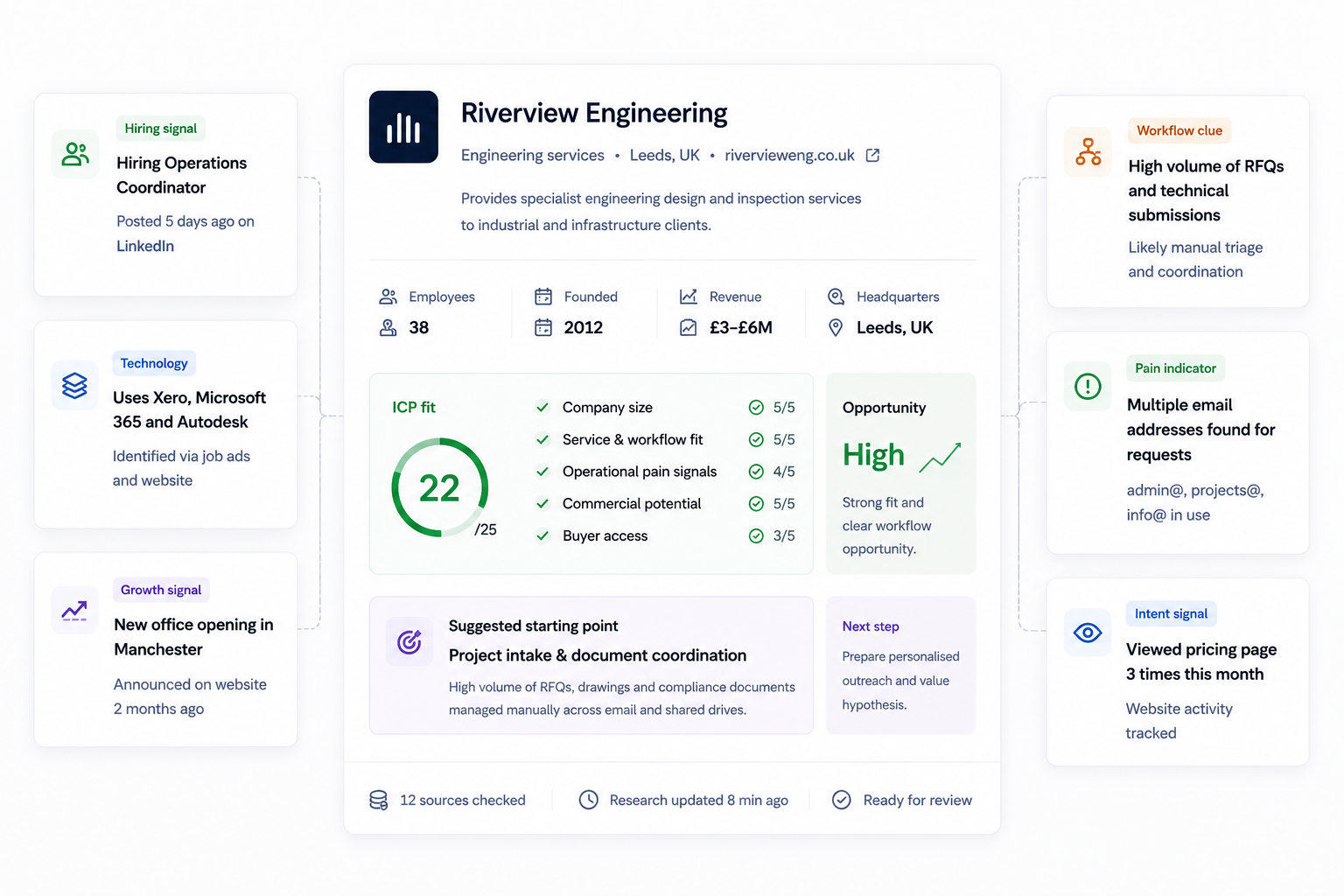
For example, Riverview Engineering — 38 employees, engineering services, Leeds — could become:
- Growth signal. Hiring an Operations Coordinator.
- Technology. Uses Microsoft 365, Xero and Autodesk.
- Workflow clue. Large volume of technical requests and document handling.
- Operational signal. Multiple inboxes appear to be involved in customer requests.
- Potential buyer. Operations leadership identified.
Now the sales record contains context rather than just contact information.
3. Assess the company against your ideal customer profile
The system can then compare each company against the characteristics that actually matter to your business.
That might include:
- Company size
- Geography
- Sector
- Operational complexity
- Likely pain
- Workflow fit
- Buyer accessibility
- Commercial potential
- Timing or trigger signals
Instead of “this looks like an interesting company,” you get something closer to: strong fit, with evidence of operational complexity, current hiring and a workflow Layer is well positioned to investigate.
The score itself is not the important part.
The useful part is the reasoning behind it.
Your team should be able to see why a company has been prioritised.
4. Look for reasons why now might matter
A good customer is not necessarily a good sales opportunity today.
Timing matters.
The system can surface signals such as:
- Hiring new operations staff
- Opening a new office
- Expanding into another region
- Implementing new software
- Growing headcount
- Launching new services
- Increasing administrative roles
- New operational leadership
These do not prove that a company has a problem.
They create useful context.
For example: the company has recently expanded into two new locations and is hiring an Operations Coordinator.
That might suggest increasing coordination complexity.
It gives the salesperson something worth investigating rather than pretending the problem is already known.
5. Identify a plausible opportunity
Once enough evidence exists, the system can suggest a potential starting point.
For example:
Potential opportunity: project intake and document coordination.
Why: high volume of RFQs, technical documents moving by email, multiple handoffs, a growing operations team, and existing software that could potentially be connected.
Importantly, this remains a hypothesis.
The system should not tell the salesperson “this company definitely has an inefficient process.”
It should say: there is enough evidence here to make this worth a conversation.
That is a much more credible way to sell.
6. Prepare a relevant outreach angle
Once a strong-fit opportunity has been identified, the system can prepare a first draft.
Instead of generic outreach such as “we help businesses automate with AI,” the draft can use the context already gathered.
I noticed you’ve recently expanded the operations team and appear to handle a significant amount of project and compliance documentation. Businesses at this stage often end up with a lot of coordination sitting between email, spreadsheets and existing systems.
The salesperson now starts with something relevant.
They can review it, change the angle, add their own judgement, reject it, or approve it for sending.
The research work happens in the background.
The external conversation stays under human control.
Nothing gets sent just because the system found a prospect
This distinction matters.
A Sales Opportunity Intelligence system can research, enrich, score, prioritise, identify signals, prepare context, suggest an angle, create a draft and update approved CRM fields.
That does not mean it should automatically contact every company it finds.
Your team remains responsible for deciding: is this a company we actually want to approach? And is this the right way to approach them?
The goal is to reduce the work required to make that decision, not remove the decision altogether.
It can work with the CRM you already use
The system does not need to become another sales database.
The CRM should remain the place where your commercial records live.
Depending on the business, the workflow might connect:
Prospect sources. Approved company lists, directories, forms or existing sales data.
Public research. Company websites, relevant public business information and other approved research sources.
CRM. HubSpot, Salesforce or the system your team already uses.
Internal knowledge. Ideal customer profiles, sales criteria, previous objections and approved sales guidance.
Communication. Email drafts or existing sales workflows, with sending kept behind the appropriate approval step.
The technology should fit around the existing commercial process rather than forcing the sales team into an entirely new stack.
What this could look like in practice
Imagine the system reviews 50 companies in a target market.
It does not hand your salesperson a list of 50 names.
Instead:
- 50 companies researched
- 31 don’t show enough evidence of fit
- 12 look potentially relevant
- 7 show strong fit
- 3 have both strong fit and a useful current trigger
Those three arrive in the CRM with:
- Company context
- Relevant signals
- Fit assessment
- Potential workflow opportunity
- Likely decision-maker
- Recommended outreach angle
- Prepared first draft
Your salesperson can spend their time reviewing the three potentially worthwhile conversations, rather than manually researching all 50 companies.
That’s the leverage.
What Layer would actually build
This is not a single off-the-shelf prospecting product.
The example shown here represents the system pattern.
A real implementation would start by defining:
- What a good customer actually looks like
- Which companies should be researched
- What signals matter
- Which sources are appropriate
- How prospects should be scored
- What belongs in the CRM
- What the system may prepare automatically
- What requires human review
- How outreach should be controlled
Layer would then build the simplest system needed to connect those steps.
Some parts may be straightforward automation.
Other parts may use AI where judgement, research interpretation or language generation genuinely helps.
The practical outcome
The goal is not to create the biggest possible lead list.
It is to help the sales team spend more time on the opportunities most likely to matter.
A useful Sales Opportunity Intelligence system should mean:
- Less manual company research
- Better-qualified prospects entering the CRM
- Clear evidence for why each company is worth attention
- More relevant outreach
- Less time spent on poor-fit accounts
- Human control before external communication
And ultimately: your sales team starts with researched opportunities instead of a list of names.
Example shown is a theoretical system design using synthetic data. Any real implementation would be scoped around the organisation's existing CRM, approved information sources, sales process, data requirements and communication controls.