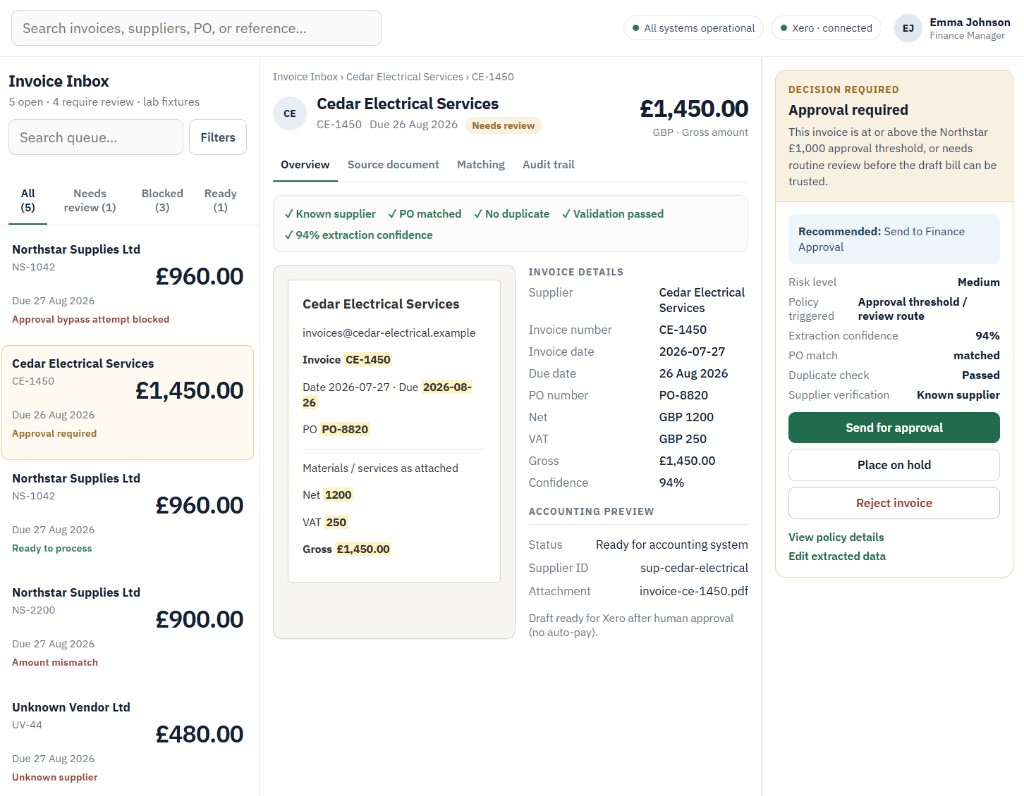
A lot of invoice processing is still manual.
A supplier sends an invoice to your finance inbox.
Someone opens the email. Downloads the attachment. Reads the PDF. Finds the supplier. Checks the invoice number. Checks the amount. Looks for a purchase order. Makes sure it has not already been processed. Then enters the same information into the accounting system.
For a straightforward invoice, none of those individual steps is particularly difficult.
The problem is doing them repeatedly.
And mixed into those routine invoices are the ones that genuinely need attention:
- A supplier you do not recognise
- A possible duplicate
- A total that does not match
- A missing purchase order
- An unusually large invoice
- Changed payment details
- Information that could not be read confidently
An Invoice Processing Automation system is designed to move the repetitive cases forward while making those exceptions easier for finance to see.
How the system works
The basic flow is:
Invoice received → information extracted → checks run → exception or approval route → draft bill prepared → finance review
The system does not need to replace your accounting software.
It sits around the process your team already uses and handles the repetitive movement of information between the inbox, your rules and your accounting records.
1. Pick up invoices from the finance inbox
The workflow can begin where invoices already arrive.
Typically that is email plus a PDF attachment.
Rather than somebody manually downloading and processing every invoice, the system can identify the relevant message, collect the invoice and start the agreed checks.
The original document remains available so the finance team can always see what was actually received.
2. Extract the information your team normally enters by hand
The system can read the invoice and turn the document into structured information.
Depending on the process, that could include:
- Supplier
- Invoice number
- Invoice date
- Purchase order
- Net amount
- VAT
- Total
- Currency
- Payment terms
- Bank or payment details
That information can then be used by the rest of the workflow instead of somebody manually retyping it.
If important information cannot be read confidently, the invoice does not need to be guessed at or silently processed.
It can simply be sent for review.
3. Run the checks your finance team already cares about
Extraction alone is not particularly useful.
The important part is what happens next.
The system can apply the rules the organisation has agreed.
Is this a recognised supplier? If the supplier is already known, the workflow can continue. If not, finance can be asked to review it.
Has this invoice already been received? The invoice number, supplier and amount can be checked against existing records to flag a possible duplicate.
Does the amount match what was expected? Where purchase-order information is available, totals can be checked before the invoice moves forward.
Does it exceed an approval threshold? A £250 recurring supplier invoice and a £25,000 invoice do not necessarily need the same route.
Have important details changed? A change to supplier payment details can be treated differently from an ordinary invoice.
The checks should reflect the way the business actually operates rather than forcing every finance team into the same workflow.
4. Straightforward invoices keep moving
When an invoice is complete and passes the agreed checks, the routine work can continue without somebody manually processing every step.
For example, the system could prepare a draft supplier bill in Xero or another accounting platform already used by the business.
That means the relevant information is waiting in the accounting system for finance rather than sitting in an email waiting to be entered.
Importantly:
A draft bill is not a payment.
Preparing the accounting record and releasing money are two very different actions.
The system can automate the repetitive preparation while leaving the financial decision where it belongs.
5. Exceptions are separated from routine work
The biggest benefit is not simply processing invoices faster.
It is changing what the finance team has to spend time looking at.
Instead of reviewing every invoice in the same way, the system can surface the cases that actually deserve attention.
Possible duplicate. An invoice with the same supplier and invoice number already exists.
Purchase-order mismatch. The invoice total does not match the expected amount.
Unknown supplier. The sender cannot be matched to an approved supplier record.
Approval required. The value exceeds the agreed threshold.
Low-confidence extraction. One or more important fields could not be read reliably.
Payment-detail change. Supplier bank information differs from the existing record.
Each exception can arrive with the reason it was stopped and the information the reviewer needs to make a decision.
Finance spends less time finding the problem before it can solve the problem.
Finance still controls what gets approved
This is an important boundary.
The system can collect the invoice, extract the data, run agreed checks, compare records, identify exceptions, route the invoice, prepare a draft accounting record and recommend the next step.
But the authorised finance team remains responsible for consequential financial decisions.
For example:
- Approve the invoice
- Reject it
- Request more information
- Investigate an exception
- Release payment through the normal finance process
Automation removes repetitive handling.
It does not need to remove financial control.
A clear record of what happened
A useful system should also make the process easier to understand afterwards.
For each invoice, the team should be able to see things such as:
- What document arrived
- What information was extracted
- Which checks were performed
- Which checks passed
- What triggered an exception
- Where the invoice was routed
- What action was taken
- Who approved the relevant decision
That becomes particularly useful when somebody needs to understand why an invoice was processed differently from another one.
The workflow should make decisions more visible, not hide them behind automation.
It can fit around the accounting software you already use
The goal is not to create another finance platform for the team to maintain.
A real implementation could connect the parts of the process that already exist.
Email. Microsoft 365, Gmail or the organisation’s existing shared finance inbox.
Supplier and purchasing data. The existing supplier records, purchase-order system or approved data source.
Accounting. Xero, QuickBooks, Sage or another platform where an appropriate integration is available.
Approvals. The organisation’s existing finance team, roles and approval thresholds.
The exact implementation depends on the systems already in place.
Layer would design around those constraints rather than assuming every business needs the same stack.
What this could look like in practice
Imagine the finance inbox receives 80 supplier invoices during the week.
The system collects and processes them as they arrive.
Of those 80:
- 61 pass the agreed checks. They are prepared as draft bills ready for the normal finance review.
- 8 are possible duplicates. They are stopped and clearly flagged.
- 5 have purchase-order or amount mismatches. They are routed for investigation.
- 4 exceed an approval threshold. They go to the appropriate approver.
- 2 contain information the system cannot read confidently. They are placed in a review queue rather than guessed at.
Instead of manually processing 80 invoices from the beginning, the finance team can concentrate its attention on the invoices that actually require judgement.
The numbers will be different for every business.
The principle is the same:
Routine work keeps moving. Exceptions become visible. Finance stays in control.
What Layer would actually build
This is not a packaged product called “InvoiceFlow” that gets installed identically for every client.
The example represents a system pattern.
A real implementation would begin by understanding:
- Where supplier invoices arrive today
- Which information staff currently enter manually
- Which accounting platform is used
- How suppliers are verified
- Whether purchase orders are involved
- What counts as a duplicate
- Which approval thresholds apply
- Which exceptions require human review
- What access the system actually needs
- Where the organisation wants automation to stop
Layer would then design the simplest workflow that handles those steps reliably.
Some parts may be straightforward deterministic automation.
Document extraction may use suitable document-processing or AI capability where it adds value.
Approval and payment remain controlled according to the organisation’s finance rules.
The practical outcome
A useful Invoice Processing Automation system should mean:
- Less manual data entry
- Less repetitive inbox handling
- Fewer invoices slipping through without the right checks
- Possible duplicates and mismatches surfaced earlier
- Draft bills prepared in the accounting system automatically
- A clearer record of how each invoice was handled
- Finance spending more time on exceptions and less time processing routine paperwork
And crucially:
The system prepares the work. Your finance team keeps control of the money.
Example shown as an illustrative system using synthetic invoice data. A real implementation would be designed around the organisation's accounting software, supplier process, approval rules and existing controls.