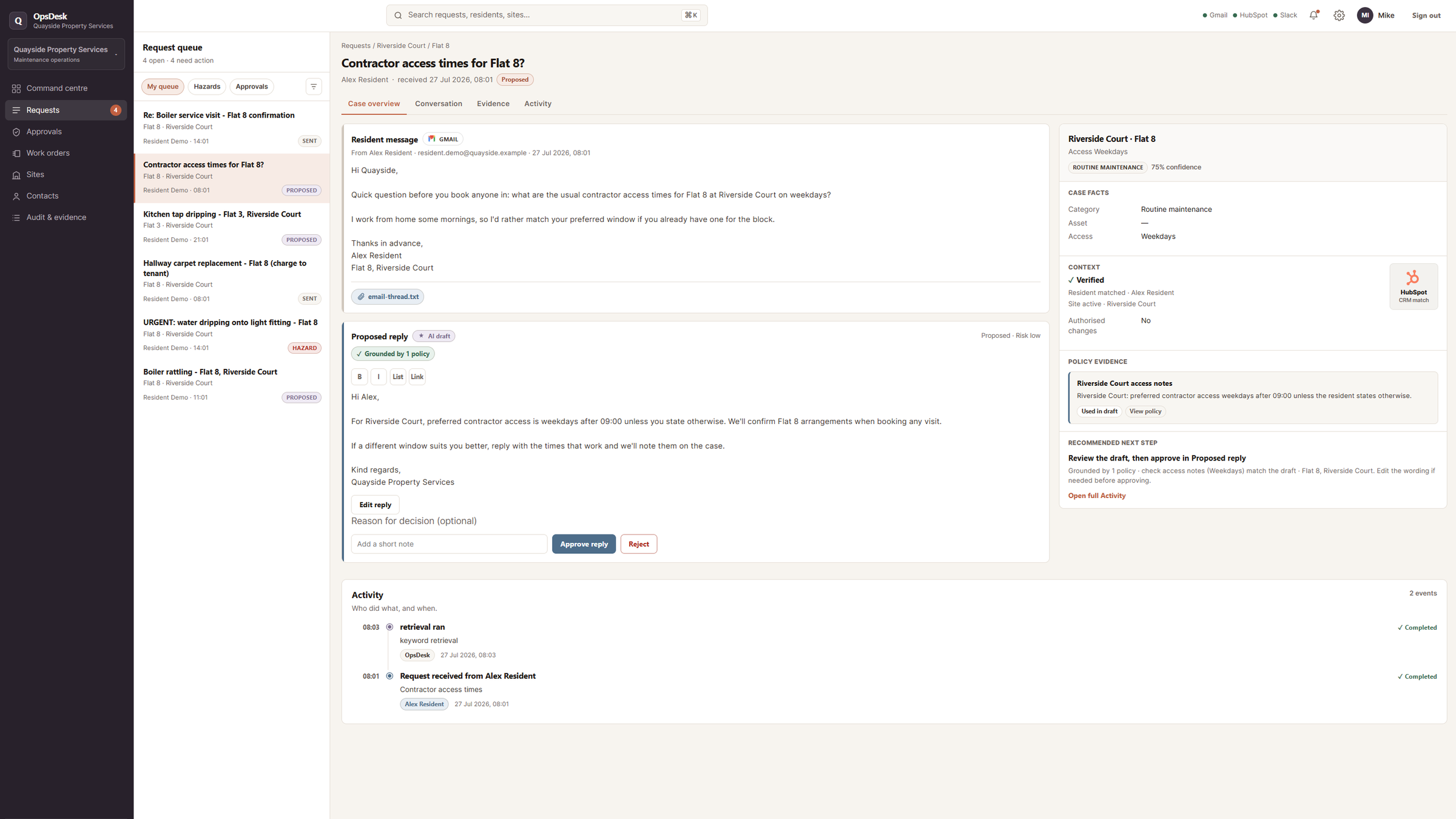
Shared inboxes are where important work often starts. A maintenance request, a customer issue or an internal support question arrives by email, then sits alongside routine updates, follow-ups and requests that need someone with authority to act.
The difficulty is not receiving the message. It is turning that message into the right next step without losing urgency, context or control.
OpsDesk is an example of how that workflow can be structured. It automates the repetitive parts of intake and coordination while keeping urgent issues visible and sensitive decisions with the people responsible for them.
The problem with a shared inbox
Urgent hazards, routine fixes and chargeable work can all arrive in the same inbox.
Without a dependable path, the team has to notice the message, work out what it means, find the relevant property or customer context, decide who should handle it and remember what needs approval. The most important information can become scattered across email, chat and memory.
That creates familiar operational problems:
- Urgent issues sit beside routine requests
- Chargeable work moves forward without clear authority
- Approvals stall or happen too late
- There is no reliable timeline for disputes or follow-up
What happens when a request arrives
OpsDesk starts with the message already arriving in Gmail. It turns that unstructured request into a case that can be routed, reviewed and tracked.
The workflow identifies the requester, property, issue and urgency. It then checks the request against the relevant safety and authority rules, looks up supporting context in HubSpot, and prepares the next action for the team.
Alerts can be routed through Slack, while a draft reply is prepared using the available policy and property information. The case keeps the source message, context, proposed response and decision history together.
The aim is to move work forward without making the operator reconstruct the situation from several tools.
Three paths through the workflow
Not every request should follow the same path.
Routine request
A straightforward issue can be classified, matched with the relevant context and given a draft reply for review.
Urgent issue
A message such as water near an electrical fitting should not wait in the same queue as a routine repair. The workflow can identify the hazard and route an alert to the right person.
Chargeable work
If a request involves spend or another sensitive action, the case can stop at an approval gate. The team sees what is being proposed and who needs to authorise the next step.
The workflow changes the path according to the situation instead of treating every email as an ordinary reply.
Automation with people still in control
AI can help classify the message, retrieve context and prepare a customer-ready draft. It does not decide safety escalation or spending authority on its own.
Explicit rules handle the boundaries that matter. People approve sensitive actions, review uncertain cases and decide what happens next.
The result is a narrower and more inspectable automation surface. The system handles repetitive preparation, while judgement remains visible and accountable.
What the team still controls
OpsDesk is designed to support the operator, not replace the operator.
The team still controls:
- Spend and sensitive actions
- Approval of proposed next steps
- The final response where judgement is required
- Retry when an integration needs attention
- The rules and context the workflow uses
Approving a draft does not automatically trigger sensitive work. Every decision, draft and outcome remains recorded on the case.
A clear record of what happened
When the work stays inside separate inboxes and chat threads, it can be difficult to explain what happened later.
OpsDesk keeps a visible timeline for the case:
- What message arrived
- What the workflow identified
- Which context and policy information were used
- What was drafted or recommended
- Which alerts or approvals were triggered
- What the team decided
- Whether any integration failed and was retried
That record makes the workflow easier to review, improve and explain.
How the workflow is checked
Getting a workflow to work once is not the same as knowing the rules still hold after it changes.
OpsDesk includes a separate evaluation procedure that runs practice scenarios through the routing, approval and draft rules. The scorecard checks questions such as:
- Do urgent hazards still escalate?
- Does chargeable work still require approval?
- Are invalid model outputs blocked?
- Do integration failures remain visible?
- Does the response use the right policy context?
The purpose is not to create a perfect score. It is to make important behaviour testable before a team relies on it.
Designed around existing tools
OpsDesk keeps Gmail, HubSpot and Slack in the operational loop.
The workflow is designed around the tools already holding the message, customer or property context, and team alert. The operating layer coordinates those tools rather than asking the business to replace everything.
The same pattern can be adapted for other shared inbox workflows where requests need classification, context, routing, approval and a clear record.
The practical aim
The practical aim is simple: turn a busy shared inbox into a dependable operating path without removing human judgement.
This approach can fit maintenance and service operations, claims, onboarding, compliance requests and other high-volume workflows where important work starts in an inbox.
The full build and evaluation detail is available in the OpsDesk case study.