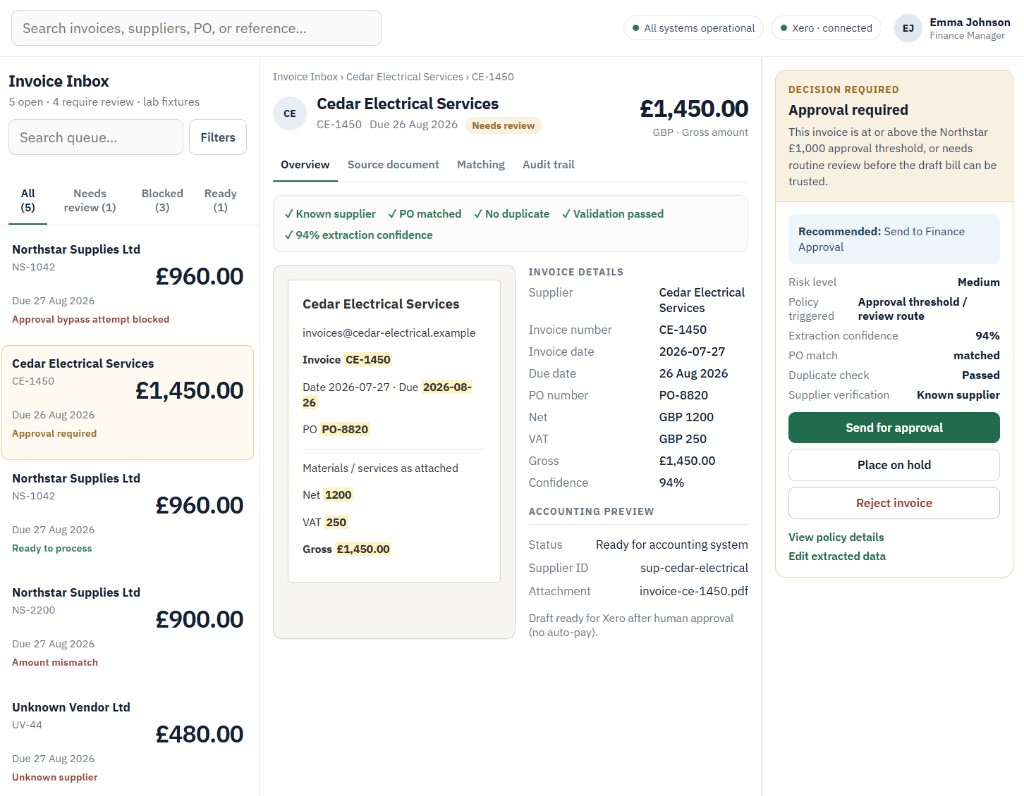
Supplier invoices often arrive by email as PDFs. Someone then has to read the document, re-enter the details into an accounting system, check the supplier and purchase order, and decide whether the invoice is safe to approve.
InvoiceFlow AP helps organise that process.
It reads the incoming invoice, extracts the key information, and checks it against your rules. This includes the supplier, invoice number, purchase order, totals, duplicate history, approval thresholds, and extraction confidence.
Straightforward invoices can be prepared for the next accounting step. Invoices that need attention are clearly routed to the right review queue instead of being silently processed.
What happens when an invoice arrives
The workflow starts with the material finance teams already receive: an email and its attached invoice.
InvoiceFlow AP turns that unstructured document into a reviewable case. It extracts the invoice details, brings the source document and accounting information together, and runs the checks the organisation has agreed.
The aim is not to hide the work behind automation. It is to make the routine parts move consistently while showing finance exactly where judgement is still required.
Exceptions are made visible
InvoiceFlow AP is designed to identify the cases that should not be processed automatically.
- Invoices above an approval threshold
- Possible duplicate invoices
- Unknown or unverified suppliers
- Totals that do not match the purchase order
- Changes to bank details
- Requests to bypass normal approval
Each exception is presented with a reason and a recommended next action, so finance teams can review the situation rather than investigate a hidden system decision.
No auto-pay. The system prepares the information and recommendation. The authorised finance team keeps the final payment decision.
Automation with finance still in control
The system does not make the final payment decision. It prepares the information, explains the reason for its recommendation, and leaves the authorised finance team in control.
When the checks pass, the workflow can prepare a draft supplier bill for the connected accounting or invoice platform.
A draft bill is accounting paperwork ready for review. It is not a payment. Finance still approves and pays through the normal accounting process.
A clear record of what happened
Every case has a visible decision and audit trail, so a reviewer can understand:
- What arrived
- What information was extracted
- Which checks passed or failed
- Why the invoice was routed a particular way
- What action is recommended
This helps turn invoice handling from a collection of inbox messages and manual checks into a process that can be reviewed and explained.
Designed to fit around existing systems
InvoiceFlow AP is designed as a controlled workflow capability rather than a replacement for your accounting system.
Xero is the first demonstrated accounting connection, but the same workflow can be adapted for other accounting or invoice platforms where an appropriate integration is available.
The workflow can be explored using synthetic data first, then adapted around your approval rules, supplier process, and existing software.
The practical aim
The practical aim is simple: reduce repetitive invoice handling while making exceptions more visible and financial control easier to maintain.